What equipment do you need for online guitar classes?
Learn what you actually need for online guitar classes, including a suitable device, stable camera position, clear audio, tuner and simple practice setup.
August 20265 min read
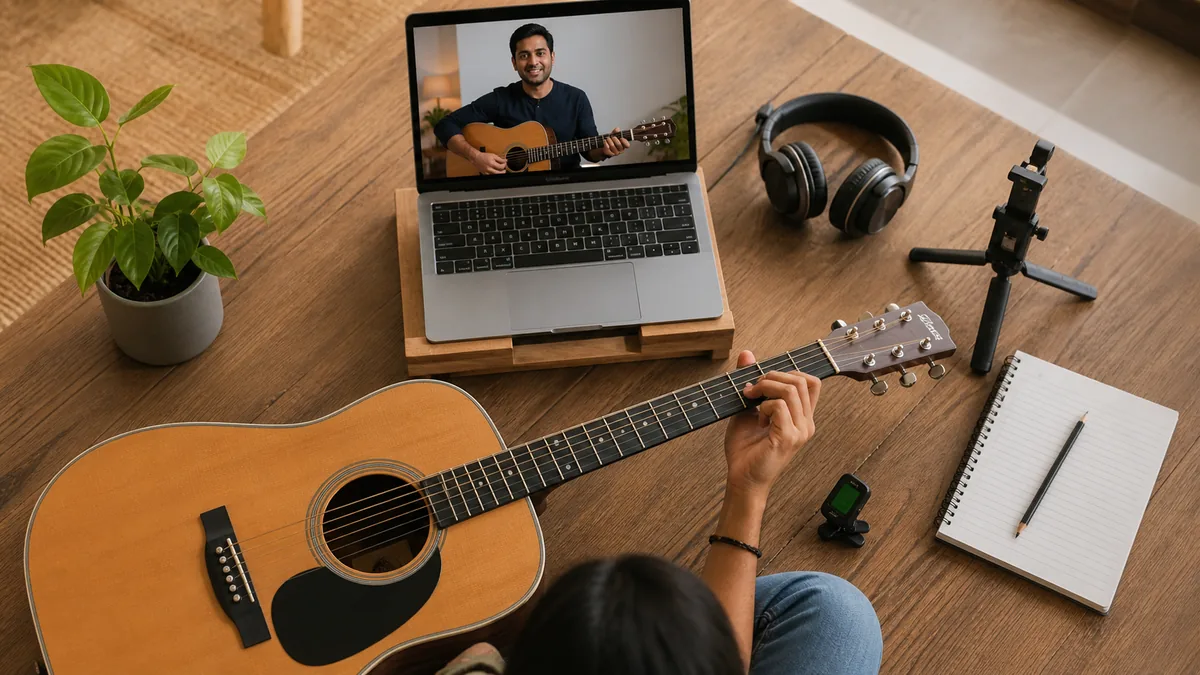
You do not need a home studio to take an online guitar class. A guitar, a device with a camera and a reasonably stable internet connection are enough to begin. The quality of the lesson depends more on what the teacher can see and hear than on buying expensive equipment.
A simple setup prepared before class helps the teacher notice finger placement, posture, rhythm and sound. This guide separates the essentials from the optional upgrades so beginners can start without unnecessary spending.
The essential online guitar lesson setup
For a first lesson, focus on five basics: a playable guitar, a phone or computer, a stable camera position, a quiet space and a way to tune the instrument. Everything else can be added later if it solves a real problem.
- An acoustic or electric guitar in playable condition.
- A phone, tablet or computer with a working camera and microphone.
- A stable internet connection for live video and conversation.
- A tuner or reliable tuning app.
- A quiet, well-lit place where both hands can be seen.
Choose a device you can position properly
A laptop is convenient because its screen is large enough to see demonstrations and lesson notes. A tablet or phone can work just as well when it is placed on a stand. The important part is stability. A handheld phone moves too much and makes it difficult to play naturally.
Position the screen where you can see it without twisting your neck. The camera should show your fretting hand, strumming hand and enough of your upper body for the teacher to check posture.
Find the most useful camera angle
Place the camera slightly in front of the guitar rather than directly beside you. A side angle may show one hand clearly while hiding the other. Before class, sit in your normal playing position and check the preview.
- Keep the entire guitar neck inside the frame.
- Make sure the strumming or picking hand is visible.
- Avoid placing the camera so low that the guitar blocks both hands.
- Use a stable stand or solid surface instead of balancing the device.
- Leave enough distance to move comfortably without leaving the frame.
The teacher may ask you to move closer for a detailed technique check. A device that can be adjusted quickly is more useful than an elaborate fixed setup.
Good lighting matters more than an expensive camera
A clear image helps the teacher see finger placement. Face a window or place a lamp in front of you. Avoid sitting with a bright window directly behind your body because the hands and guitar may appear dark.
Ordinary room lighting is usually enough when it falls evenly across the instrument. You do not need a ring light unless the room remains too dark for the camera.
How to improve audio without buying a microphone
Start with the microphone already built into your phone, tablet or computer. Keep the device close enough to hear the guitar but not so close that the sound distorts. Reduce background noise from television, fans and conversations when possible.
During a live lesson, avoid playing loud music from another speaker while the teacher is listening to your guitar. A backing track can be useful later, but clear instrument sound is more important when correcting technique and timing.
Do you need headphones?
Headphones can make the teacher's voice easier to hear and reduce echo. However, some headphone microphones are designed mainly for speech and may filter or compress guitar sound. Test both options during the demo class and use whichever lets the teacher hear the instrument more clearly.
If you use wired headphones, make sure the cable does not interfere with the guitar or picking hand.
Online electric guitar lesson equipment
Electric guitar students need a way to hear the instrument. A small practice amplifier is the simplest option. Set it at a moderate volume so the device microphone can capture both your playing and your voice.
An audio interface or digital processor can provide a cleaner direct signal, but it is optional for beginners. Software routing can also make conversation more complicated, so add it only when you understand the setup or the teacher recommends it for a specific purpose.
Explore Jam And Play's online electric guitar classes
Online acoustic guitar lesson equipment
An acoustic guitar normally needs no amplification. Sit where the device microphone can hear the instrument naturally. If the guitar has a pickup, you still do not need to connect it for an introductory lesson unless the teacher asks.
Check that the guitar is comfortable to play, the strings are not excessively old or difficult to press and the instrument holds its tuning. Setup problems can sometimes look like technique problems.
Explore Jam And Play's online acoustic guitar classes
Small accessories worth keeping nearby
- Two or three picks in comfortable thicknesses.
- A clip-on tuner or tuning app.
- A capo if the songs or lesson plan require one.
- A notebook or digital lesson notes.
- A metronome app for slow rhythm practice.
- A guitar stand or safe place to keep the instrument accessible.
None of these accessories needs to be premium. Choose simple tools that remove friction from practice.
Check your internet before the lesson
Video calls need a stable connection more than extreme speed. Sit somewhere with reliable Wi-Fi, close unnecessary downloads and ask other household members to avoid heavy streaming during the class when possible.
If video freezes, reduce other network use before buying new equipment. A wired connection can help on a computer, but it is not required for most home lessons.
Prepare five minutes before class
- Tune the guitar.
- Charge or connect the device.
- Open the lesson link and check the camera preview.
- Place the guitar, pick and lesson notes within reach.
- Reduce background noise and notifications.
- Keep one question from your practice week ready.
This small routine protects lesson time. The teacher can begin with music instead of waiting for the device and instrument to be prepared.
What you do not need as a beginner
You do not need a professional camera, studio microphone, expensive headphones, multiple amplifiers or advanced recording software for your first online lessons. Those tools may become useful later, but they do not replace a clear roadmap, specific feedback and regular practice.
Begin with the equipment you already own. Upgrade only when you can name the problem the new item will solve.
Use a demo lesson to test everything
A demo lesson is the easiest way to test camera angle, audio and internet stability. Ask the teacher whether both hands are visible and whether the guitar can be heard clearly. Make one adjustment at a time instead of changing the whole setup.
Learn how Jam And Play's live online guitar classes work
Compare one-to-one and group online guitar classes
Prepare for your first online guitar lesson
Start simple and make the lesson visible
The best equipment for online guitar classes is the setup that lets the teacher see your technique, hear your instrument and communicate without interruption. For most beginners, the device and microphone they already have are enough.
Jam And Play offers live online guitar lessons with structured guidance and flexible scheduling. Book a free demo using your current setup, test it with a teacher and upgrade only if a real limitation appears.
Want a clearer first step?
Meet a mentor, talk about what you want to play and get a learning plan built around your schedule.